Going Agentic with LangGraph: A Packing Planner That Knows When to Go Shopping
Part 4 of a series on building Wardrobe AI. Parts 1–3 built the daily recommender and its feedback loop, all of it plain, straight-line Python. This post is where the app grows a second kind of brain: an agent that can decide its own next step. All the code in this post is public, in github.com/JiamanBettyWu/mise; snippets link to their source.
Procrastinating on a suitcase
I built most of this app while procrastinating on packing for a trip to Oaxaca, Mexico. At some point, staring at a half-empty suitcase and a very full wardrobe app, the obvious thought landed: the app already knows every piece of clothing I own, so why am I doing this by hand? Picking a weather-appropriate outfit for one morning and picking a week’s worth for a trip are the same problem, just scaled up. So I pointed the thing at my suitcase.
But trips have a minor complication that single days don’t, and I’d learned it the hard way. The previous winter I’d gone to Harbin, in northeastern China, where it was −13°F (−25°C), colder than anywhere I’d ever lived. I showed up under-equipped, because when you’ve never packed for that kind of cold, you don’t even know what you’re missing until you’re standing in it. That experience became a feature: I didn’t just want the app to pick from what I own; I wanted it to notice what I don’t own but clearly need for this trip, and ideally help me go get it. A packing planner that can say “you have no coat that survives −13°F, here are three to buy” is the planner I wish I’d had.
That second requirement is what made this more than a bigger version of the daily recommender. It needs to branch.
Why a straight-line function wasn’t enough
The daily recommender from Part 2 is a straight line: weather in, pipeline, model, outfit out. Every run does the same steps in the same order. That’s fine when the job is always identical.
Packing isn’t always identical. Most of the time the flow is “choose clothes from the closet, done.” But sometimes, in the Harbin case, the right answer involves work that only happens conditionally: spotting a gap, turning it into a sensible shopping search, and going to find products. You can’t express “do these extra three steps, but only if you found a gap” cleanly as a straight line. You need the program to look at what it just produced and decide where to go next.
That “decide its own next move at runtime” quality is what people mean by an AI agent, and the tool I used to build it is LangGraph.
What LangGraph actually is (gently)
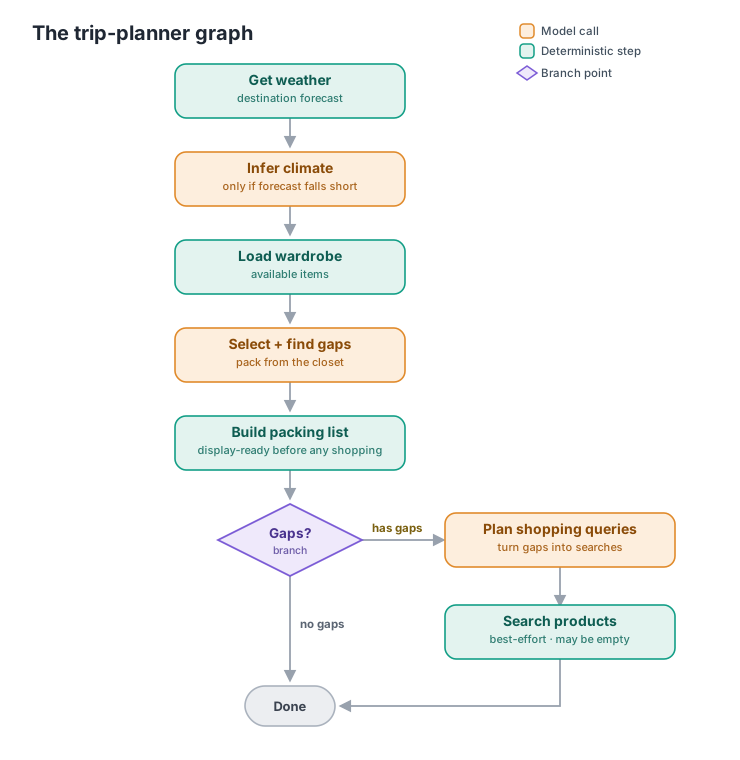
If you’ve ever drawn a flowchart (boxes for steps, arrows for “what happens next,” diamonds for “if this, go here; otherwise go there”) you already understand the model. LangGraph lets you build exactly that as runnable code:
- Nodes are the boxes: individual steps (get the weather, load the wardrobe, call the model).
- Edges are the arrows: “after this node, go to that one.”
- Conditional edges are the diamonds: a little function looks at the current state and returns which way to go.
There’s also a shared state object that every node reads from and writes to as the program walks the graph; think of it as a clipboard passed from step to step, each one adding its findings. You define the graph once, “compile” it, and then hand it an input to run. That’s the whole mental model. Here’s the packing graph:
A diagram is the graph at rest. Here it is in motion — a replay of one real
recorded run, with timestamps straight from its Weave trace (compressed 8×).
Press play, and notice how much of the run lives inside reason_and_select’s
LLM call compared to everything else:
Press play to watch a real recorded run (trip: paris, 5 days in mid-july) — or click any node.
Walking the graph
A few of these nodes are worth pausing on, because each one is a small design decision.
Get weather, then maybe infer it. The first node fetches a real forecast for the destination. But real forecasts only run about five days out, and I usually book trips weeks ahead, so the Oaxaca dates were well past the forecast horizon. So the second node is conditional: if the live forecast doesn’t cover the trip dates, it asks the model for a careful climate estimate (“late October in Oaxaca tends to be warm and dry, pack light layers”), explicitly flagged as an estimate, not a fake forecast. If the forecast already covers the trip, this node does nothing and passes the state through untouched.
Select, and find the gaps. The core node hands the model the trip context plus my whole wardrobe and asks for two things: a packing list built from what I own, and a list of gaps, things this specific trip needs that nothing in my closet covers. This is the Harbin lesson encoded: the −13°F coat I didn’t own shows up here as a gap, with a one-line rationale (“daytime highs well below freezing”). The model also throws in non-wardrobe essentials (adapters, sunscreen, a passport) tailored to the destination.
The branch: the actual agentic moment. After selection, a tiny router function looks at the state and answers one question:
def check_gaps(state):
return "has_gaps" if state.get("gaps") else "no_gaps"backend/services/trip_planner.py
That’s it: it doesn’t change anything, it just reports which way to go. The graph’s conditional edge does the dispatching:
graph.add_conditional_edges(
    "generate_output",
    check_gaps,
    {"has_gaps": "plan_purchase_queries", "no_gaps": END},
)backend/services/trip_planner.py
Notice the branch hangs off generate_output: the tidy, categorized packing list gets assembled immediately after selection, and only then does the graph decide whether it’s finished. No
gaps? Done. Gaps found? Detour through two more nodes that append product
suggestions to the plan. This is the difference from the daily
recommender in one line of code: the program’s path is no longer fixed; it
depends on what the model just discovered.
Plan the search, then shop. Down the gap branch, one node turns each gap into a concise shopping query (a model call that knows my sizing department and style preferences, so “−13°F coat” becomes something you’d actually type into a store), and the next runs those searches against a product API.
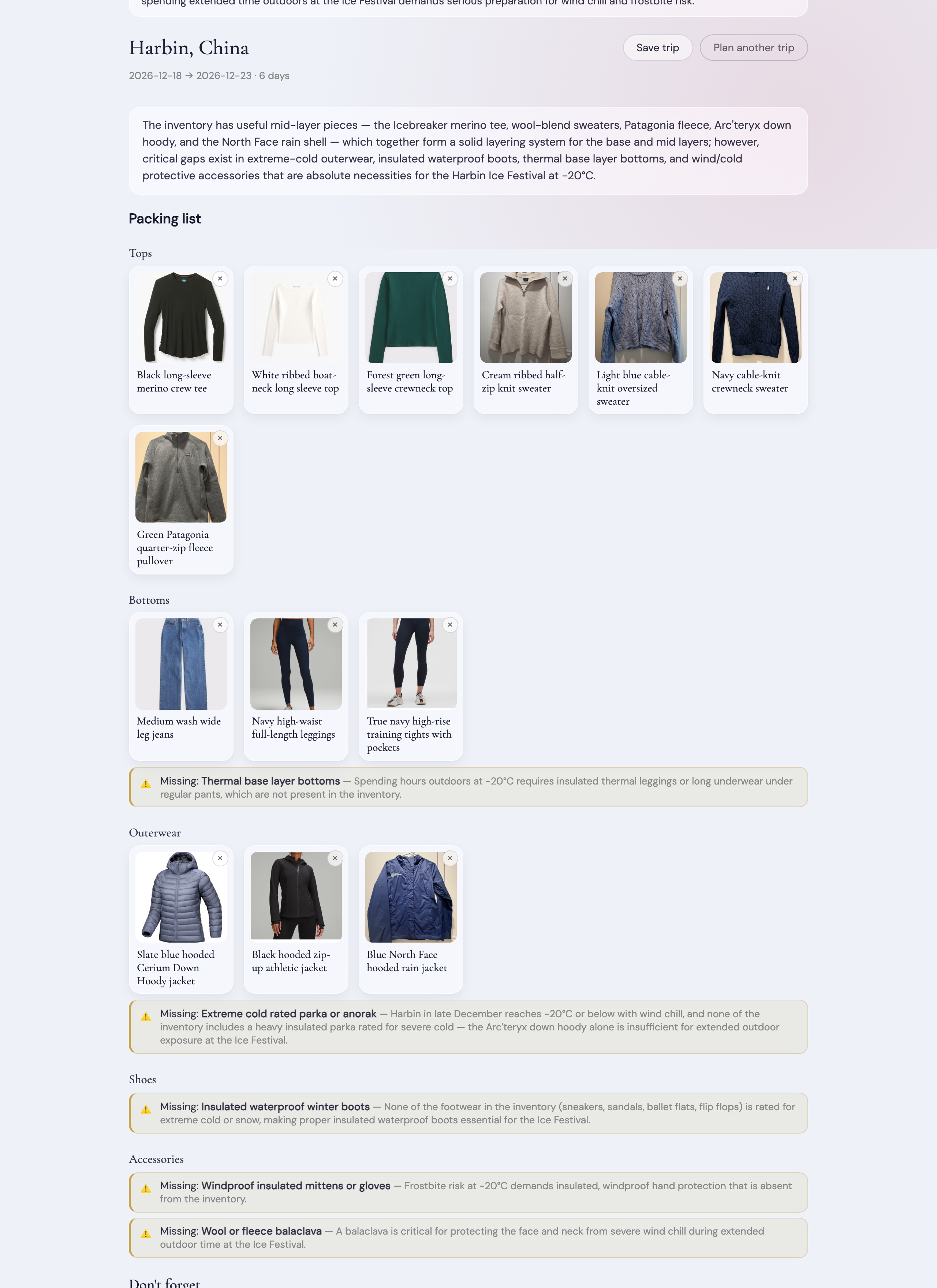
(Fittingly, this screenshot is also the degrade-don’t-crash rule caught in the wild: the shopping API’s quota was exhausted when I captured it, every product search failed, and the plan rendered anyway — gaps visible, product links absent.)
The unglamorous rule that makes it usable: degrade, don’t crash
Adding steps adds ways to fail. The shopping search hits a third-party API that can rate-limit, time out, or just return nothing. The climate inference is a model call that could error. A naive agent treats each of these as fatal and hands the user an error page instead of a packing list.
I made the opposite choice everywhere: every enrichment is best-effort. If the shopping search fails, the gap still shows up in your plan; it just says “you need this” without product links, which is still useful. If the query-planning model call fails, the system falls back to a dumb-but-fine search built from the gap’s own words. If the climate inference fails, you get a conservative generic note. The graph is structured so the core deliverable — a packing list from clothes you own — survives the failure of every optional extra around it. For a tool you reach for the night before a flight, “slightly less helpful” beats “broken” every time.
Two smaller decisions in the same spirit, for the LangGraph-curious: nodes never mutate the shared state in place; each one returns just the piece it computed, and LangGraph merges it in. Beyond keeping each step independent and easy to reason about, that’s what makes the graph safe to checkpoint and resume: with no hidden in-place change to replay, the framework can pause a run, persist it, and pick it back up from any node. And the graph is compiled once when the module loads and reused for every request, rather than rebuilt each time; it’s a fixed structure, so there’s no reason to pay to assemble it twice.
Watching it think (and the reorder it forced)
A graph with a slow leg has a UX problem: the shopping searches can take 30 seconds, and originally the user (me) stared at a spinner for all of it. The
fix was streaming: the endpoint now emits an event as each node finishes, so the UI can narrate progress (“checking weather… choosing from your wardrobe…”) and, crucially, render the packing list the moment it exists while the shopping searches are still running. The generate_output node originally sat after the shopping leg, which forced the finished packing list to wait on product searches it didn’t depend on. Moving it before the branch cost nothing and made the core deliverable appear seconds earlier. The graph structure turned out to be a user interface decision, not just a control-flow one, which was not something I expected when I drew my first flowchart.
Plans you can keep (and a photograph, not a feed)
One more feature earned its way in through use: at first, a generated plan evaporated on page refresh, and regenerating doesn’t give you the same plan back (the pipeline is stochastic by design). For a checklist you’re working through the night before a flight, that’s useless. So plans became saveable, with two decisions worth noting. First, nothing is saved automatically; generating is exploring, and only an explicit Save turns a draft into a keepsake. Second, a saved plan is stored as a frozen snapshot of exactly what was generated, never re-interpreted against the app’s current logic, so a plan saved months ago can’t break when the schema around it evolves. With one deliberate exception: the “packed” checkmarks on a saved plan read and write my live wardrobe state, not the snapshot. The plan is a photograph; the packing status is the real suitcase. Mixing the two tenses on purpose, snapshot for the decision, live state for the world, is what makes an old plan both stable to look at and still useful to pack from.
A small bonus: the search as an MCP tool
Because the product search ended up being a clean, self-contained capability, I also exposed it as an MCP server, a small standard interface that lets other AI clients (Claude Desktop, say) call my “search for a wardrobe item” function directly. Worth being clear about what I did not do: the graph itself doesn’t call the search through MCP; it calls the plain Python function. They live in the same process, so routing through MCP would mean spawning a subprocess and serializing JSON back and forth just to reach a function one import away. MCP earns its keep across a boundary (another process, app, language, or team), not for talking to yourself. The payoff is real but external: the same unchanged server is now reusable by tools I didn’t write. I’ll likely give MCP its own deeper treatment another time.
Same tool, opposite job: next time
The trip planner is the friendly face of agentic design: it runs when I ask, I see the result immediately, and the worst failure is a missing product link. In the next post I’ll point the exact same tool, a LangGraph, at a very different job: a background process that runs every week, with no one watching, and quietly rewrites the app’s own understanding of my taste. Same graph machinery, a completely different risk profile, and a much more careful set of guardrails.
That’s Part 5.
Go deeper
Everything in this post is real, running code:
- The whole graph, nodes, wiring, and the
#124comment explaining the branch placement:build_graph()inbackend/services/trip_planner.py - The streaming endpoint and the saved-plans API:
backend/routers/trips.py - The MCP server wrapping the product search:
backend/mcp_server/